ASU Prereq Helper
Personal · Browser extension · 200+ installs across semesters
View on the Chrome Web Store ↗
Overview
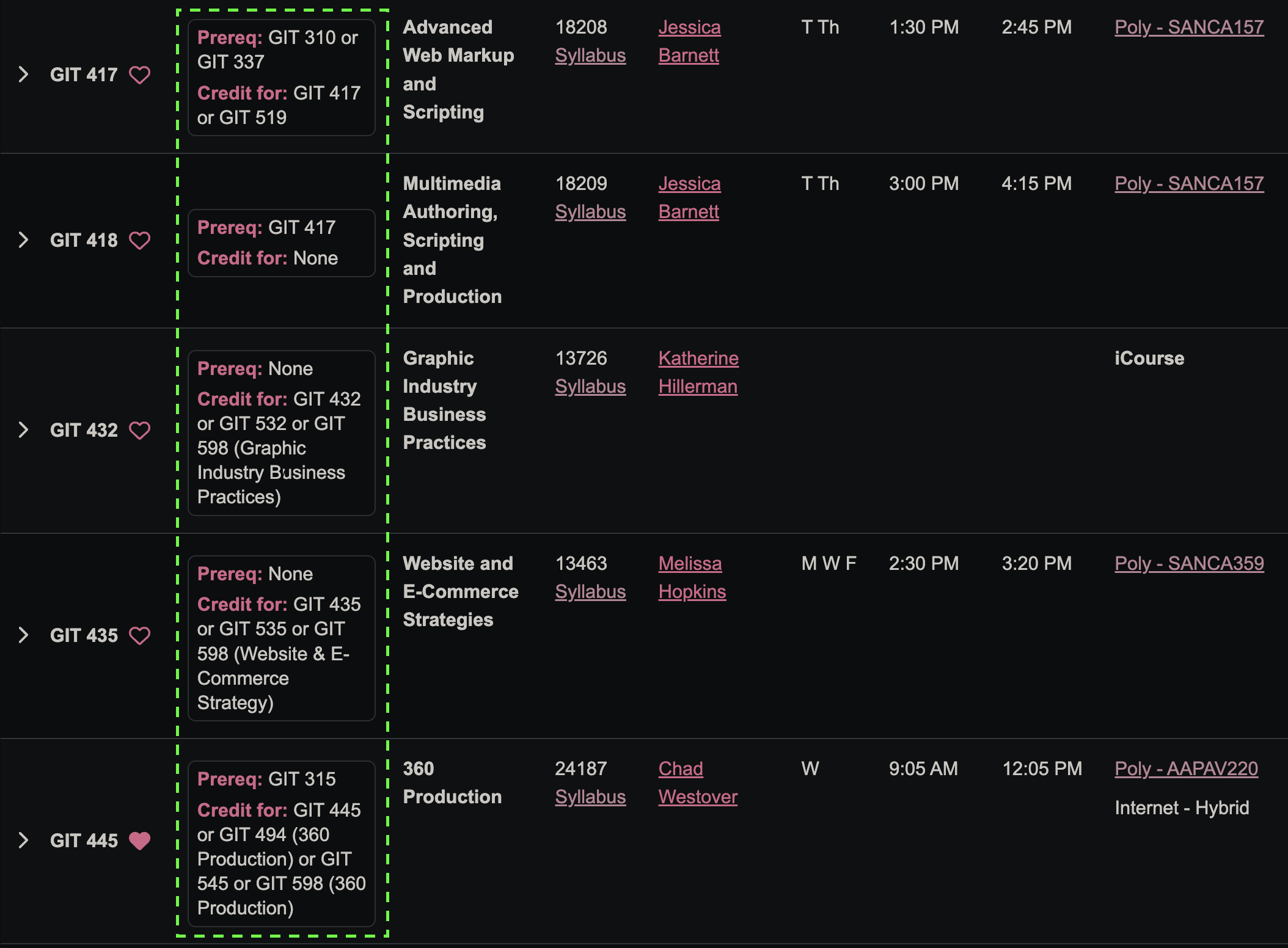
ASU Prereq Helper is meant to smooth enrollment UX on Class Search. You usually have to click into a class and comb through dropdowns to see prerequisites or what a section counts for. The extension pulls that context up next to each row so you can read it while you scroll the list, with less friction and fewer detours.
I designed the cards to sit visually inside ASU's existing system: same type rhythm, familiar maroon accents, spacing that matches the surrounding UI so it feels like it belongs there. I built it for myself first, then refined it for classmates; it only runs on supported ASU pages in your browser and does not phone home to a separate backend.
.asu-prereq-card {
  margin-left: 28px;
  background: #ffffff;
  color: #191919;
  border: 1px solid #e4e4e4;
  border-radius: 6px;
  font-size: 14px;
}
.asu-prereq-card b { color: #8c1d40; }
On the page
The injected panels hug each listing row: prerequisites on one line, credit rules underneath where relevant. Nothing replaces ASU's controls; you still enroll through their flows. Cards follow ASU's typography and visual patterns so the UI reads like part of Class Search, not an add-on.
Class Search re-renders rows as you scroll or flip pages without a full reload, so the extension watches the page instead of running once, and waits a beat before re-checking so it doesn't refire on every tiny change:
let debounceId = 0;
function schedule() {
  clearTimeout(debounceId);
  debounceId = setTimeout(processCourses, 120);
}

new MutationObserver(schedule)
  .observe(document.body, { childList: true, subtree: true });
You can scan the list at a glance while you scroll, with fewer clicks and less back-and-forth.
Reading the prerequisite text
ASU's prerequisite text is one sentence written for humans, mixing course codes, "or" alternatives, and grade minimums together. A couple of small regex passes split it into two clean lines: what a class needs, and what it counts for.
function hasCourseCode(text) {
  return /\b[A-Z]{3}\s\d{3}\b/.test(text);
}

function splitPrereqAndCredit(raw) {
  const marker = /\bCredit\s+(?:is\s+)?allowed\s+for\s*(?:only\s*)?/i;
  const m = raw.match(marker);
  if (!m) return { prereqBody: raw.trim(), creditBody: "" };
  return {
    prereqBody: raw.slice(0, m.index).trim(),
    creditBody: raw.slice(m.index + m[0].length).trim(),
  };
}
Finding the right term automatically
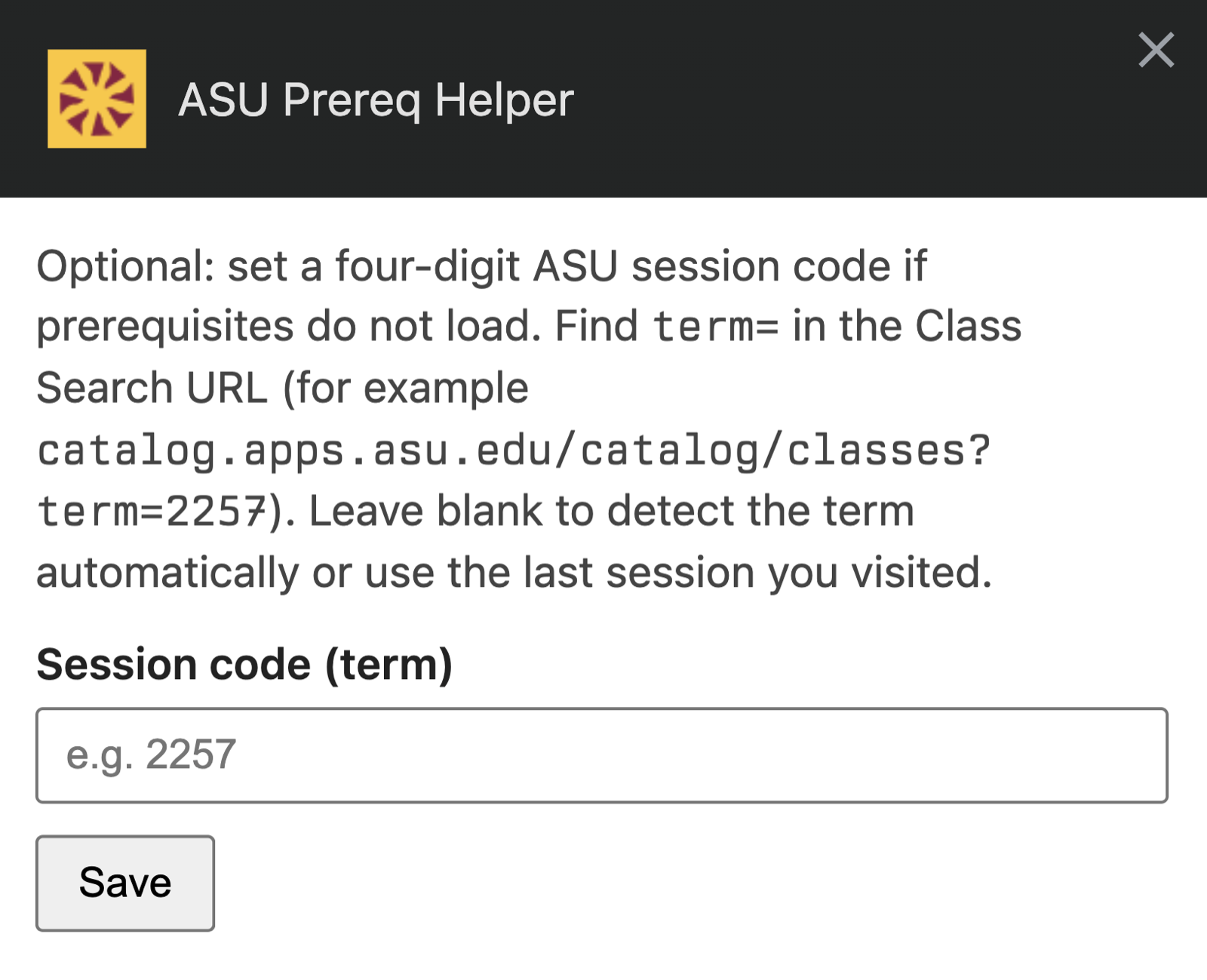
Prerequisite data is scoped to a four-digit session code baked into the page's URL. Rather than ask for it, the extension checks a few places in order: a saved manual override, the current page's URL, links on the page, then the last one it saw. It only asks if all of those come up empty:
async function resolveStrm() {
  const manual = await getManualOverride();
  if (manual) return manual;

  return detectStrmFromLocation()
      || detectStrmFromDom()
      || getLastKnownStrm();
}
How it was built
Extensions bundle everyday web tech: HTML for lightweight panels, CSS written so typography and spacing line up with how ASU already styles Class Search, and JavaScript for parsing plus DOM updates.
Manifest V3 declares host permissions for specific degree-search URLs. Background logic stays minimal; most work happens in the tab via the content script, which asks the background script to fetch requirement text and never touches a custom server:
chrome.runtime.sendMessage(
  { type: "asu-prereq-fetch-requirements", strm, subject, catalogNumber },
  (response) => {
    if (chrome.runtime.lastError) return resolve({ ok: false });
    resolve({ ok: true, data: parseRequirementText(response.raw) });
  }
);
A small Options page lets you set the session code by hand if automatic detection ever misses, with basic validation so a stray character doesn't silently break things:
Tests are mostly manual: load a known degree page, verify prerequisite and credit-for chips against catalog logic, resize the window, repeat after ASU ships markup tweaks. When selectors drift, I patch them in one module so future edits stay quick.